
Never run out of AI tokens
CodexBar is a tiny macOS menu bar app that keeps your Codex, Claude, Cursor, Gemini, and other AI assistant limits visible with session and weekly usage meters.
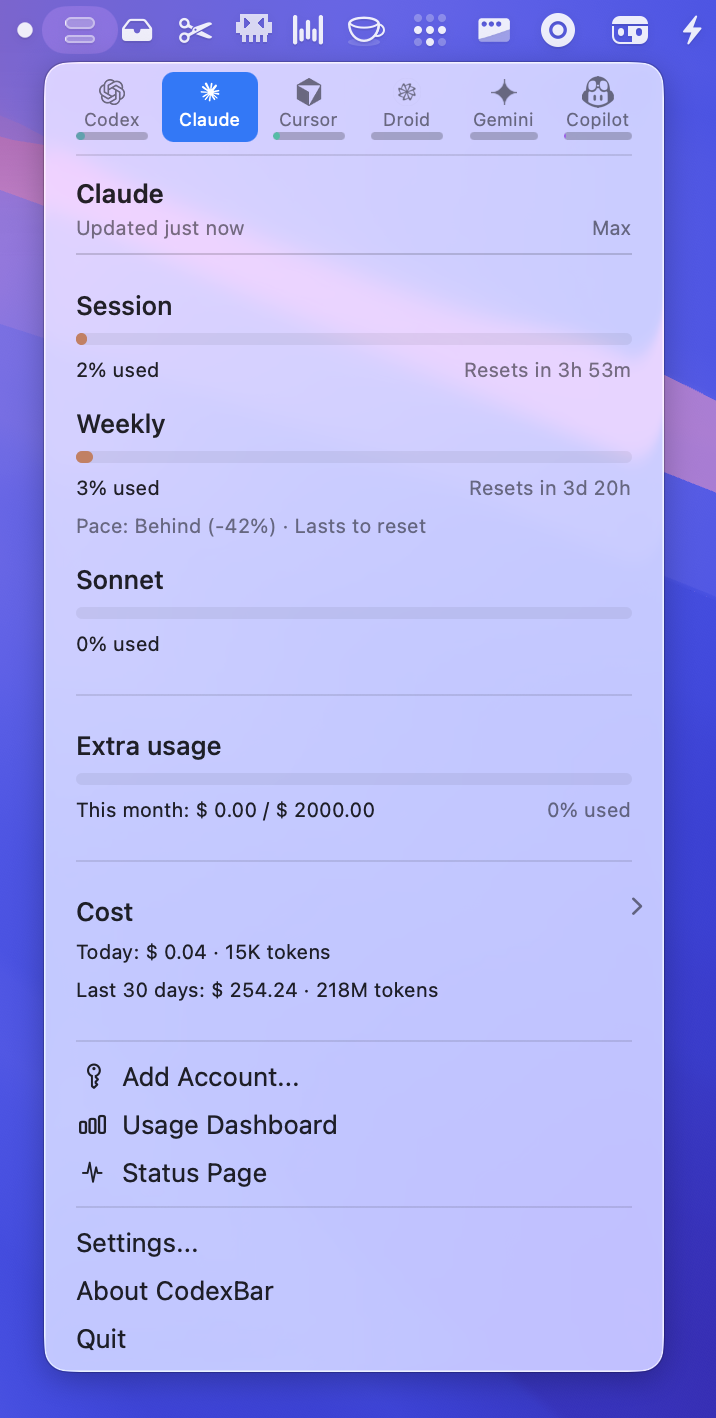
Get started in minutes
Install CodexBar and start tracking your AI usage limits immediately
Enable providers
Open Settings → Providers and toggle on the AI assistants you use:
- Codex (OpenAI)
- Claude Code
- Cursor
- Gemini
- Copilot
- And 10+ more providers
Each provider appears as a separate menu bar icon, or use Merge Icons mode to combine them into one.
Configure authentication
CodexBar supports multiple authentication methods per provider:
- CLI integration: Uses your existing
codex,claude, orgeminiCLI credentials - Browser cookies: Reuses your logged-in browser sessions (Safari, Chrome, Firefox)
- OAuth: Direct API authentication for supported providers
Explore by topic
Dive deeper into CodexBar’s features and capabilities
Menu bar interface
Learn how the two-bar meter visualizes session and weekly usage
Multi-provider support
Track 15+ AI coding assistants from a single app
Merge Icons mode
Combine all providers into one menu bar icon with a switcher
CLI commands
Access usage data from scripts and CI pipelines
Privacy & security
Understand how CodexBar handles your credentials
Configuration
Customize refresh cadence, providers, and display options
Supported providers
CodexBar supports major AI coding assistants with session, weekly, and credit tracking
Ready to track your AI usage?
Download CodexBar and never wonder when your limits reset again. Free and open source under MIT license.