OpenCLIP Documentation
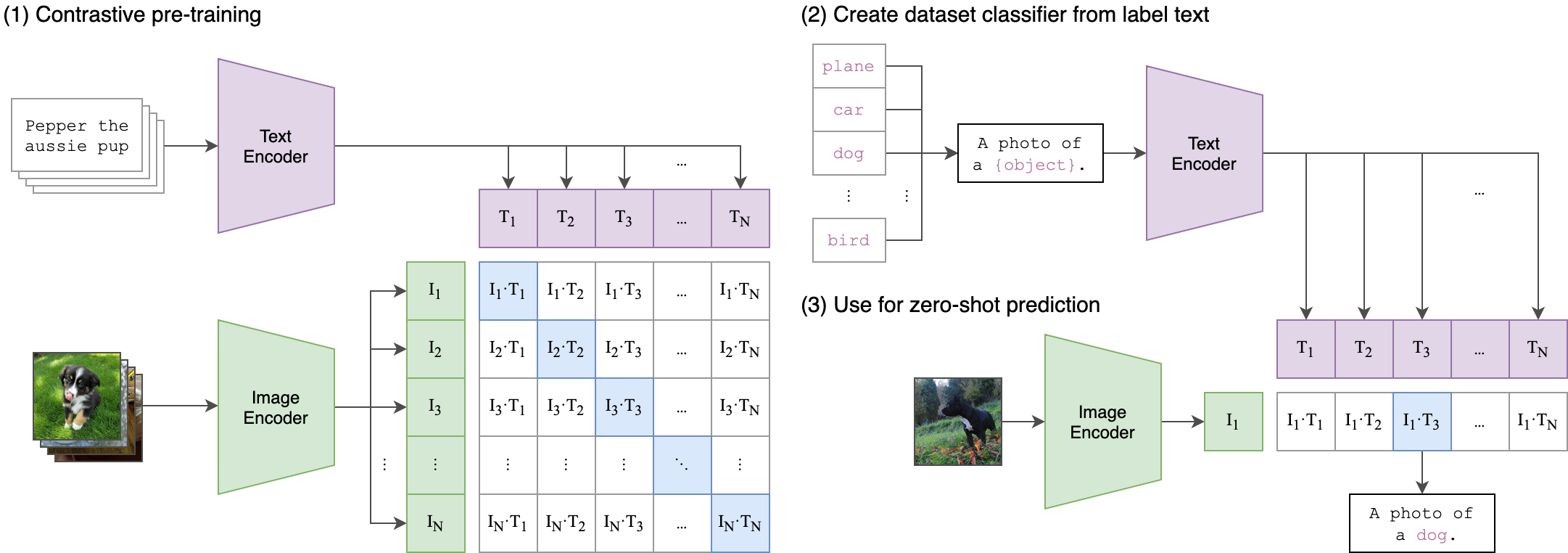
Build powerful vision-language models with OpenCLIP. Train CLIP models at scale, leverage state-of-the-art pretrained weights, and perform zero-shot image classification and retrieval.
Quick start
Get up and running with OpenCLIP in minutes
Install OpenCLIP
Install the package using pip:pip install open_clip_torch
If you plan to use timm-based image encoders (ConvNeXt, SigLIP, EVA), ensure you have the latest timm installed: pip install -U timm
Load a pretrained model
Load a model with pretrained weights and preprocessing transforms:import open_clip
model, _, preprocess = open_clip.create_model_and_transforms(
'ViT-B-32',
pretrained='laion2b_s34b_b79k'
)
model.eval()
Available pretrained models
OpenCLIP provides 80+ pretrained models. List all available models:import open_clip
# List all pretrained model configurations
open_clip.list_pretrained()
Encode images and text
Use the model to compute embeddings for zero-shot classification:import torch
from PIL import Image
# Get tokenizer
tokenizer = open_clip.get_tokenizer('ViT-B-32')
# Load and preprocess image
image = preprocess(Image.open("image.jpg")).unsqueeze(0)
text = tokenizer(["a cat", "a dog", "a bird"])
# Compute features
with torch.no_grad(), torch.autocast("cuda"):
image_features = model.encode_image(image)
text_features = model.encode_text(text)
# Normalize features
image_features /= image_features.norm(dim=-1, keepdim=True)
text_features /= text_features.norm(dim=-1, keepdim=True)
# Compute similarity and get predictions
text_probs = (100.0 * image_features @ text_features.T).softmax(dim=-1)
print("Predictions:", text_probs)
Train your own model
Train a CLIP model on your own dataset:python -m open_clip_train.main \
--train-data="/path/to/train_data.csv" \
--val-data="/path/to/validation_data.csv" \
--csv-img-key filepath \
--csv-caption-key title \
--warmup 10000 \
--batch-size=128 \
--lr=1e-3 \
--wd=0.1 \
--epochs=30 \
--workers=8 \
--model RN50
OpenCLIP supports distributed training on multiple GPUs and nodes. See the Training guide for details. Key features
Everything you need to build and deploy vision-language models
State-of-the-art models
Access 80+ pretrained CLIP models achieving up to 85.4% ImageNet zero-shot accuracy
Flexible architectures
Support for ViT, ResNet, ConvNeXt, and custom vision/text encoder combinations
Large-scale training
Battle-tested on up to 1024 GPUs with LAION-2B and DataComp-1B datasets
Zero-shot inference
Classify images without training using natural language descriptions
CoCa support
Generate image captions with contrastive captioner models
HuggingFace integration
Load models from or push to the Hugging Face Hub seamlessly
Explore by topic
Dive deeper into specific areas of OpenCLIP
Resources
Additional resources to help you succeed with OpenCLIP
Research paper
Read the reproducible scaling laws paper for contrastive language-image learning
GitHub repository
View the source code, report issues, and contribute to OpenCLIP
Pretrained model zoo
Browse the complete collection of 80+ pretrained models on Hugging Face Hub
Colab notebooks
Try OpenCLIP in your browser with interactive Jupyter notebooks
Ready to get started?
Start building with OpenCLIP today. Follow our quickstart guide to load your first pretrained model and run zero-shot classification in minutes.
Get Started